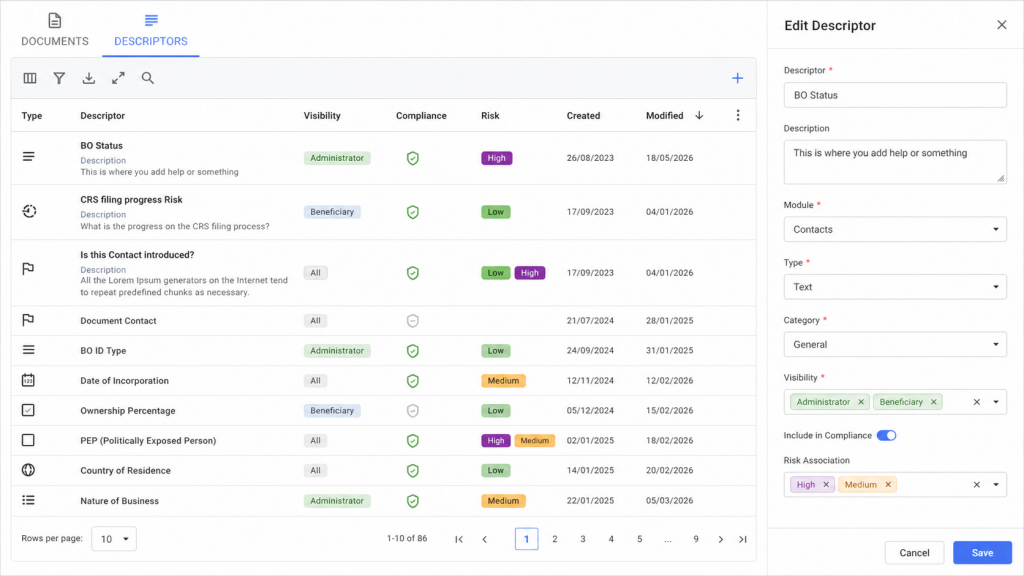
What Descriptors Are
Descriptors are configurable fields that collect structured information. They can be simple text fields, dates, numbers, selections, checkboxes, country fields, progress fields, or other supported input types.
Once created, descriptors can be displayed in the relevant module and used for compliance, risk, review, reporting, and operational workflows.
Main Parts of Descriptor Management
| Area | What It Means |
|---|---|
| Descriptor | The question or field label users will see. |
| Description | Optional helper text that explains what the descriptor is used for. |
| Module | Controls where the descriptor belongs, such as Contacts, Entities, Relationships, or Documents. |
| Type | The input type, such as text, date, number, select, checkbox, country, progress, or slider. |
| Category | Groups descriptors together so they are easier to organize and display. |
| Visibility | Controls which record types can see the descriptor. For example, a contact descriptor can be limited to certain contact types. |
| Compliance | Marks the descriptor as available for compliance policy requirements. |
| Risk | Marks the descriptor as part of risk scoring or risk-related review. |
| Review | Marks the descriptor as part of a review workflow rather than general data capture. |
| Client Portal | Controls whether the descriptor can appear in client-facing workflows. |
| PIN Locked | Marks the descriptor as sensitive so access can require a PIN. |
How to Create a Descriptor
- Open the descriptor settings area.
- Click the add button.
- Enter the descriptor question or field name.
- Add a description if users need extra guidance.
- Select the module where the descriptor should appear.
- Select the descriptor input type.
- Choose a category if the descriptor should be grouped with others.
- Configure visibility, compliance, risk, review, or portal options as needed.
- Save the descriptor.
Descriptor Visibility
Visibility controls whether the descriptor appears for a record at all. This is separate from compliance policy.
Use visibility when a descriptor only makes sense for specific contact types, entity types, relationship types, or document types.
Descriptor Types
| Type | Use Case |
|---|---|
| Text | Short free-text responses. |
| Number | Numeric values such as counts, amounts, or percentages. |
| Date | Dates such as approval dates, review dates, or expiry dates. |
| Select | Predefined options where users choose one value. |
| Checkbox | Yes/no or true/false values. |
| Country | Country-based responses used for jurisdictional or geographic data. |
| Progress | Progress-based values where completion matters. |
| Slider | Weighted values or scaled answers, often useful for risk-related scoring. |
Using Descriptors for Compliance
To use a descriptor in compliance, first mark it as included in compliance. Then configure when it is required inside descriptor compliance policies.
- Descriptor settings decide where the descriptor exists.
- Compliance policies decide when the descriptor is required.
- A descriptor must be visible before it can be required.
Using Descriptors for Risk
Descriptors can also be associated with risk. Risk-related descriptors can support risk scoring, risk review, and risk analysis depending on how your organization has configured risk calculations.
If a descriptor is used for risk, make sure the question, input type, and answer options are clear and consistent.
Managing Select, Progress, and Slider Options
Some descriptor types require predefined options or conditions. These options determine what users can select and may also affect scoring or reporting.
- Use clear option labels.
- Avoid duplicate or confusing option names.
- Review option weights carefully if the descriptor affects risk or scoring.
- Keep inactive or outdated options clean so users do not select the wrong value.
Best Practices
- Use clear, specific descriptor names.
- Add descriptions when the expected answer is not obvious.
- Use categories to keep descriptors organized.
- Limit visibility when a descriptor only applies to certain record types.
- Only include descriptors in compliance when they are truly required for compliance decisions.
- Review risk descriptors carefully because they may affect scoring.
- Use PIN locking for sensitive information.